
llms.txt vs robots.txt vs sitemap.xml: What Each File Does and How They Work Together
If you are hearing about llms.txt and wondering whether it replaces robots.txt or sitemap.xml, it does not.
These three files serve different audiences:
- robots.txt: tells crawlers what they can access
- sitemap.xml: helps search engines discover what exists
- llms.txt: curates what matters most for AI systems and agents, and typically uses Markdown formatting Google for Developers
This post gives you a clean mental model, practical examples, and a WordPress setup approach that stays maintainable.
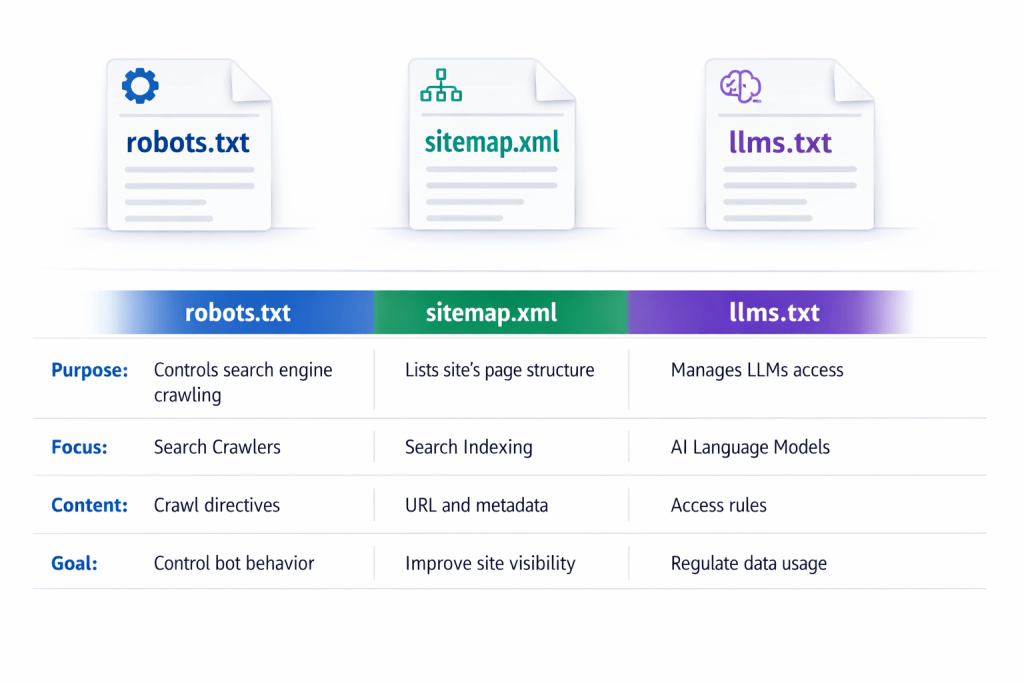
Quick comparison table (the snippet you came for)
| File | Primary audience | Primary job | Typical location |
| robots.txt | Search engine crawlers and other bots | Crawl access rules and crawl efficiency Google for Developers | https://example.com/robots.txt |
| sitemap.xml | Search engines | URL discovery, update hints, relationships Google for Developers | https://example.com/sitemap.xml |
| llms.txt | LLMs and AI agents (proposed standard) | Curated map of your best, most useful pages, usually in Markdown llms-txt+2Answer.AI+2 | https://example.com/llms.txt |
What robots.txt does (and what it does not)

A robots.txt file tells search engine crawlers which URLs the crawler can access on your site, mainly to avoid overloading your site with requests. Google for Developers
robots.txt is good for
- reducing crawl waste on low value pages (admin areas, parameter URLs, internal search results)
- protecting server resources from aggressive crawling
- setting general crawl boundaries for certain bots
robots.txt is not good for
Google is explicit here: robots.txt is not a mechanism for keeping a web page out of Google. If you need to prevent indexing, you should use other methods such as noindex or authentication. Google for Developers
Takeaway: robots.txt is about crawl access and crawl efficiency, not “please do not show this anywhere.”
What sitemap.xml does
A sitemap is a file where you provide information about the pages, videos, and other files on your site and the relationships between them. Search engines read it to crawl your site more efficiently. Google for Developers
Sitemaps can also include helpful hints like:
- when a page was last updated
- alternate language versions
extra content formats (images, video, news), depending on sitemap type Google for Developers
sitemap.xml is best for
- large sites with deep hierarchies
- sites where not every page is easily reached through internal links
- sites that publish frequently and want discovery hints
Important nuance: sitemaps are a strong hint, not a guarantee of indexing. Search engines still decide what to index.

What llms.txt is

llms.txt is a proposed standard to provide information to help LLMs use a website at inference time by offering a curated, human readable map of important resources. llms-txt
The original proposal describes it as:
- a Markdown file at /llms.txt
- containing brief background and guidance
- plus links to more detailed Markdown files and resources Answer.AI
You will also see docs platforms adopting the concept as “LLM-ready docs,” where llms.txt acts like an index pointing to Markdown-formatted pages. GitBook
llms.txt is best for
- highlighting your top pillar pages, FAQs, and docs
- clarifying what your site is about, and which pages to use first
- reducing confusion when multiple pages cover similar topics
- pairing with Markdown exports so content is easy to parse and audit
Takeaway: llms.txt is more like a curated map than a control file. Search Engine Land
How they work together (recommended baseline)
Think in layers:
Layer 1: robots.txt (access and crawl efficiency)
- keep crawl budgets focused
- protect sensitive or low value areas
Layer 2: sitemap.xml (discovery)
- help search engines find the pages you actually want crawled
- support faster discovery for new content
Layer 3: llms.txt (curation for AI answers)
- point AI systems to your best pages
- group content by intent (pillars, FAQs, comparisons, docs)
- provide short notes that reduce misinterpretation
If you only add llms.txt without the basics, you still have a leaky foundation.
If you only have the basics without llms.txt, AI systems are more likely to stumble into weaker pages first.

When to use each file (simple decision guide)
Use robots.txt when you need to:
- reduce crawl waste or load
- block crawling of low value sections
- set bot specific crawl paths Google for Developers
Use sitemap.xml when you need to:
- improve discovery of important URLs
- communicate update hints and site relationships Google for Developers
Use llms.txt when you need to:
- provide a curated “start here” map for LLMs
- link to structured, Markdown-formatted resources
- guide AI systems to your best answers and docs llms-txt+2Answer.AI+2
Most sites should use all three.

What a good llms.txt includes (practical outline)
Based on the proposal and common implementations, a strong llms.txt generally includes: llms-txt
- short site summary (what you do, who you help)
- a “start here” list of your best pages
- grouped links by topic or intent (docs, FAQs, comparisons, services)
- optional notes like “prefer the most recent pillar page”
Pro tip: a flat list is less useful than grouped collections. This aligns with your own positioning around organizing content into custom groups.
WordPress setup: the maintainable approach
robots.txt in WordPress
- Many SEO plugins and hosting platforms let you edit robots.txt safely.
- Validate changes carefully. A single bad rule can block crawling.
sitemap.xml in WordPress
- Most SEO plugins generate sitemaps automatically.
- Submit your sitemap via Search Console if you want explicit monitoring.
llms.txt in WordPress
You can do it manually, but manual files tend to drift out of date.
Your site plan is built around the idea that the core service is generating llms.txt and Markdown files for AI search, with a funnel that includes Features, Pricing, Comparison, and How-to education.
JumpsuitAI Pro positioning:
- automated generation of llms.txt and Markdown
- custom groups to keep the file readable and prioritized
- bulk management for large archives
- customizable introductions for context
If your goal is consistency over time, automation is the difference between “we have an llms.txt” and “our llms.txt is actually useful.”
Common mistakes and how to avoid them
Mistake 1: Using robots.txt to try to hide indexed pages
robots.txt is not a reliable way to keep pages out of search results. Google for Developers
Mistake 2: Treating sitemap.xml like a ranking lever
Sitemaps help discovery and crawling. They do not force indexing or rankings.
Mistake 3: Turning llms.txt into a link dump
llms.txt should be curated. Prioritize your best pages and group them.
Mistake 4: Not keeping files updated
Outdated sitemaps and stale llms.txt links reduce trust and usefulness.
FAQs
Does llms.txt replace sitemap.xml?
No. Sitemap.xml is for search engines to discover URLs efficiently. llms.txt is a curated map intended to help LLMs and agents choose the best pages first. Google for Developers
Does llms.txt replace robots.txt?
No. robots.txt controls crawler access rules. llms.txt is not an access control mechanism. Google for Developers
Where do I put llms.txt?
At your site root, usually https://yourdomain.com/llms.txt. llms-txt
What should I link to from llms.txt?
Your best pillar pages, FAQs, comparisons, and documentation, grouped by topic or intent. The proposal explicitly supports linking to detailed Markdown resources. Answer.AI
What is the easiest way to maintain llms.txt in WordPress?
Automate it. Your content and site structure change over time, so automated generation plus grouping and bulk tools helps prevent stale maps.